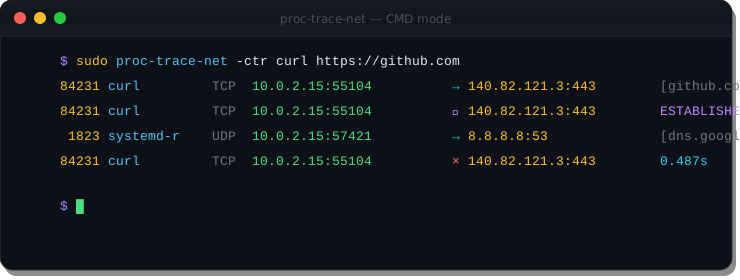
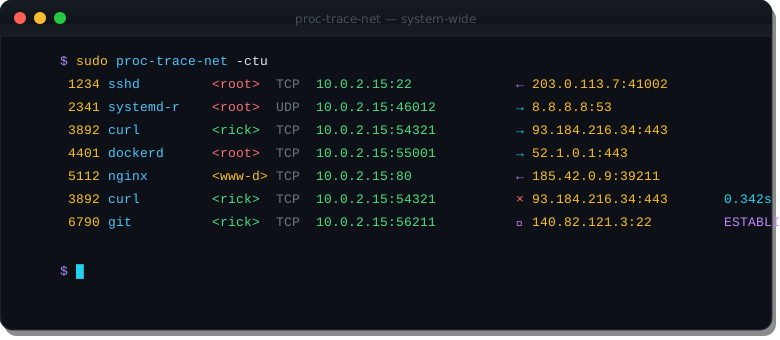
Real output from proc-trace-net. Colors rendered as-is from the terminal.
Pass a command after the flags to trace only its network connections. The -t flag adds close timing โ showing how long each connection was open before it was torn down.
Run without a command to trace every TCP/UDP connection on the machine. The -u flag shows the owning user โ root in red, normal users in green. Direction arrows immediately show whether a connection is inbound or outbound.
The -U flag exposes every TCP state transition from the conntrack stream. Useful for debugging connection teardown issues, TIME_WAIT accumulation, or half-open connections.
3892 curl TCP 10.0.2.15:54321 โ 93.184.216.34:443 3892 curl TCP 10.0.2.15:54321 โ 93.184.216.34:443 ESTABLISHED 3892 curl TCP 10.0.2.15:54321 โ 93.184.216.34:443 FIN_WAIT 3892 curl TCP 10.0.2.15:54321 โ 93.184.216.34:443 TIME_WAIT 3892 curl TCP 10.0.2.15:54321 ร 93.184.216.34:443 0.342s
Watch a package installer or untrusted script to see every network connection it makes โ before you decide to trust it. Each outbound connection shows the destination IP and port in real time.
9001 bash <root> TCP 10.0.2.15:52100 โ 52.1.0.1:443 9002 curl <root> TCP 10.0.2.15:52101 โ releases.example.com:443 9002 curl <root> TCP 10.0.2.15:52101 ร releases.example.com:443 1.204s 9003 systemctl <root> TCP 127.0.0.1:52200 โ 127.0.0.1:1-systemd 9003 systemctl <root> TCP 127.0.0.1:52200 ร 127.0.0.1:1-systemd 0.043s
Watch every registry endpoint and CDN contacted during a docker pull โ from the host, without modifying the container.
4401 dockerd TCP 10.0.2.15:55001 โ 52.1.0.1:443 4401 dockerd TCP 10.0.2.15:55001 ร 52.1.0.1:443 0.182s 4401 dockerd TCP 10.0.2.15:55011 โ 18.64.12.99:443 4401 dockerd TCP 10.0.2.15:55011 ร 18.64.12.99:443 3.441s 4401 dockerd TCP 10.0.2.15:55021 โ 18.64.12.99:443 4401 dockerd TCP 10.0.2.15:55021 ร 18.64.12.99:443 1.229s
Project logo